
GROUNDLINK
APPLICATION
Built from real user insights, the Ground Link app goes beyond simply booking sports venues, it fosters connections, builds teams, and encourages consistent participation. The app transforms isolated play into a smooth, accessible, and community-driven experience, making it easier for athletes to discover opportunities, coordinate games, and engage with like-minded players. Its design emphasizes clarity, continuity, and meaningful engagement, ensuring that every interaction supports both social connection and seamless participation in recreational sports.

roundLink
Connecting Athletes, Courts, and Teams, everywhere!
PROJECT OVERVIEW
USERS: Athletes, Coaches, and Casual players
ROLE: UX/UI designer
PROJECT DURATION: 5 weeks
TOOLS: Figma, Adobe XD, Premiere Pro
Ground Link is a mobile application designed to help athletes quickly find, book, and connect for sports fields and venues. Users can view available time slots, check field conditions, and invite or join other players or teams through a single, streamlined platform.
01
ONBOARDING GUIDANCE
The onboarding page introduces the app, guides users to register an account, asks for privacy permission, and allows user to set their preference
Progress bar
Onboarding guidance title and main body
Call-to-action button
Secondary button


PROCESS
Followed a User-centered design approach:
Empathize → Define → Ideate → Prototype → Test → Iterate
01
RESEARCH METHODS
EMPATHIZE
-
Conducted interviews with athletes and casual sports players.
-
Gathered raw data about their needs, motivation and behaviors.
-
Mapped end-to-end user journeys.
02
DEFINE
-
Used affinity diagramming to uncover key patterns, trends and themes.
-
Identified core user pain points
-
Synthesized findings into three key insights: Accessibility, Reliability and Community engagement
-
Created research- driven personas to guide and prioritize design decisions.
-
Framed a clear problem statement based on user needs
-
Defined the primary design goal
ANALYSIS
03
IDEATION
During ideation, key user needs were identified, multiple user flows and feature ideas were explored focusing on simplifying how players discover, book, and join games.
To address these design challenges, used How Might We statements to clearly define our goals and inspire creative, user-centered solutions that addressed the biggest user frustrations”
SOLUTIONS
05
USABILITY TESTING
Usability testing validated core flows, with all users completing key tasks without guidance. Feedback confirmed strong usability, effective communication features, and a sense of community beyond booking.
Future improvements focus on real-time availability, skill-based matchmaking, and broader user testing.
ITERATION
04
PROTOTYPING
I began with low-fidelity paper wireframes to explore layouts and flows with potential users, then moved into digital wireframes in Figma, refining page hierarchy, iconography, and navigation.
The app includes seven main screens, Onboarding, Home, Grounds, Ground
Details, Games, Teams, and Profile, organized into four core areas: Discovery, Booking, Community, and Profile.
VISUAL DESIGN
06
LEARNINGS
Working on GroundLink emphasized the role of user research and collaboration in creating meaningful design solutions. The project showed how effective UX addresses both practical needs and emotional drivers, such as confidence and connection. It also strengthened the ability to turn research insights into clear, consistent interface decisions and iterate quickly through testing and refinement. For a complete overview of Ground Link, watch the App Walkthrough.
APP WALKTHROUGH VIDEO
02
DEFINE
Players consistently encountered difficulties discovering suitable sports venues, booking available time slots, and building meaningful connections with other players.
01
PAIN POINTS
-
Lack of clarity on which sports were available at “open gym” locations
-
No reliable way to confirm if a field or court was already occupied.
-
Lengthy and repetitive booking processes across multiple platforms
-
Limited opportunities for social connection or team continuity after games.

02
THREE MAIN INSIGHT THEMES
-
Accessibility: Players wanted a simple, centralized way to discover open grounds and drop-in games without navigating multiple disconnected platforms.
-
Reliability: Users valued accurate, real-time information about field availability and conditions to avoid wasted trips or double bookings.
-
Community Engagement: Beyond just booking, many participants expressed a desire for social connection, to play regularly with familiar teammates and build a sense of belonging.
03
PERSONAS
To understand this better, we interviewed students and frequent players, and we identified a clear gap in the recreational sports experience, especially among international students and casual athletes in Metro Vancouver.
04
PROBLEM STATEMENT
Athletes and casual sports players need a reliable way to find playable sports locations and join nearby games, so they can participate more easily without struggling to identify availability or connect with players of similar skill levels.
03
To gain deeper insight into the problem space, interviews with students and frequent players highlighted a significant gap in the recreational sports experience, particularly for international students and casual athletes in Metro Vancouver.
These insights informed the creation of two primary personas:
-
Davis: an international student new to the city who struggles to find drop-in soccer games and connect with players of similar skill levels.
-
Samantha: a multi-sport athlete who must navigate multiple websites or contact facilities to confirm court availability and suitability, resulting in frustration with fragmented and inconsistent booking systems.”
PERSONAS


04
design goal
Create a unified mobile platform that allows athletes and casual sports players to easily discover nearby indoor and outdoor sports venues, check real-time availability, join or host games, and connect with others, eliminating friction from fragmented booking systems and cumbersome sign-ups while fostering lasting sports communities.
To address these design challenges, used How Might We statements to clearly define our goals and inspire creative, user-centered solutions.
03
IDEATION
How Might We statements
HOW MIGHT WE
How might we make it easier for individuals to discover playable sports locations nearby?
HOW MIGHT WE
How might we simplify the booking process and eliminate redundant sign-ups?
HOW MIGHT WE
How might we help players connect with each other based on shared interests or skill levels?
HOW MIGHT WE
How might we enhance the social connection or team continuity beyond a single game?
This approach ensured that solutions improved accessibility, usability, and community engagement.
-
Find and Join Games: Search and filter by sport, location, and skill level
-
View Ground Information: Access maps, reviews, and condition tags
-
Create or Join Teams: Support recurring play and team continuity
-
Connect with Teammates: Enable in-app communication and social interaction

01
ONBOARDING GUIDANCE
The onboarding flow was designed to be friendly and fast, it introduces the app, requests location and notification permissions, and allows users to set sports preferences right away. This makes personalized recommendations possible from the very first screen.
04
PROTOTYPING
CORE FEATURES AND PROTOTYPING
02
HOME PAGE
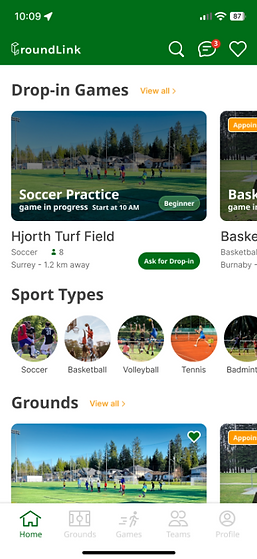
The home page functions as a personalized hub. Users can instantly see recommended grounds or drop-in games based on their chosen sports, skill level, and distance. The top bar includes quick actions for search, messages, and favorites, which users can access from anywhere.
05
GAMES PAGE
Split into two sections:
My Games, where users can track invitations, accepted games, and hosting activities. Explore Games, where users can browse community drop-in events and request to join. The page layout mirrors the home feed for visual consistency.
03
GROUNDS PAGE
Here, users can browse available courts and fields with powerful filter and sort tools, by location, rating, distance, and sport type. Each ground card provides key information like images, field condition, and whether booking is required. A “favorite” button lets users build their own shortlist of preferred locations.
06
TEAMS PAGE
This feature enables users to create teams, join existing groups, and chat with teammates. It strengthens ongoing connections beyond one-time drop-ins. Users can manage groups, apply to new teams, and organize recurring games.
04
GROUNDS DETAILS PAGE
This is where utility meets community. Each page provides detailed ground info, navigation to the location, the ability to host a game, view schedules, and post reviews. I added a calendar overlay where users can check playability, read comments, or join planned events directly.
07
PROFILE PAGE
Users can customize their profile, show sports preferences, and view their full activity history. The layout includes quick navigation between past games, joined teams, and personal information.
_edited.jpg)
STYLE GUIDE
05
Usability Testing & Iteration
Once the prototype was complete, unmoderated testing was conducted with users matching the
persona profiles to validate core flows. Participants were asked to complete three core tasks:
finding and joining a game, checking a ground’s status, and creating or joining a team.
THE RESULT
100% completion rate for key tasks (joining games, checking ground status, and team creation).
KEY FEEDBACK
Users highly valued the community-building features, specifically the in-app chat and review systems.
NEXT STEPS
Future versions will focus on real-time facility API integration and refined skill-based matchmaking.


